For many users, improving efficiency while browsing is an important concern. Switching among multiple search engines can be useful, but opening each search engine's site is cumbersome, and there are times when you need quick access to a specific search capability. The free open-source Chrome extension, SearchJumper, which supports switching between multiple search engines and instant searches from the context menu, is helpful in those cases. This tool offers extensive search engine customization, regular-expression search, and AI integration, which together improve search efficiency. It also considers ease of use with features such as right-click search and multi-browser support. As a result, it expands capabilities for business, research, and everyday information gathering.

Overview of SearchJumper's Main Features
| Title | Details |
|---|---|
| Seamless switching among multiple engines | Intuitively switch between various search engines such as Google and Bing. The extension stands out for enabling one-click switching across many search providers. |
| Instant right-click search for text and images | Instantly search selected text or images from the browser's right-click menu. Improves accessibility from the context menu. |
| Add and edit custom search engines | Freely add or edit search engines to build custom workflows suited to your needs. Shortcut key support is included. |
| Advanced keyword highlighting with regex support | Highlight keywords using regular expressions. This makes complex search strings easier to visualize and supports efficient information extraction. |
| Completely free and open source | The source code is published and there are no ads or tracking. Designed with privacy in mind for safe use. |
| AI assistant integration | Integrates with AI search assistants such as ChatGPT and Google Gemini to provide a new search experience. |
| Full privacy respect | Does not collect user data, display ads, or perform tracking, ensuring high security and privacy protection. |
| Extensive customization options | Beyond adding search engines, you can fine-tune settings like shortcuts to match your preferences and improve usability. |
Concrete Examples of When SearchJumper Is Useful
| Who | Useful Scenarios |
|---|---|
| Those involved in research or academia | Quickly compare and validate specialized information across multiple search engines, significantly improving research efficiency. |
| People who frequently gather information online | Perform instant searches on text or images with a single click from the browser context menu, reducing workflow friction. |
| Users who want to optimize usability | Customize search engines and keyboard shortcuts to tailor daily browsing to personal preferences. |
| Data analysts and research staff | Improve visibility of important keywords with regular-expression highlighting, enabling efficient extraction of needed information from large datasets. |
From Installation to Basic Usage
- Install SearchJumper from the Chrome Web Store
- Import the author's collection of over 300 rules (unnecessary ones can be cleaned up later)
- Open settings from the icon shown in the browser toolbar and add or edit search engines
- Select text or images on a web page and try tile search, drag search, or right-click search
- Execute an instant search from the address bar using
sj [engine name] [search terms] - Use advanced features as needed, such as regex-based keyword highlighting, automatic highlighting, and previews
- Configure AI integration to further extend the search experience
How to Add Custom Search Engines
- Quick add: Click the search box while holding
Ctrl + Alt→ the engine will be registered automatically. - Manual add: Replace the query part of the search URL with
%sand register it. POST-style or special searches can also be configured. - Detailed edit: Adjust name, URL, icon, and other settings from the options screen to build your own workflow.
- Multi-search: Group multiple engines to perform simultaneous searches with one click — useful for research and comparison.
Characteristics Seen from User Feedback
- A very convenient plugin that lets you get results from many search engines at once.
- The extension offers many features and can feel complex until you get used to it, but it is highly satisfying once mastered.
- The high degree of customization in the settings lets users tailor it to their preferences.
- Adding search engines via keyboard shortcuts is very convenient; the design feels brilliant.
- It works well across multiple browsers and is excellent for easily adding custom search engines.
Impressions from Use
The UI is quite complicated.
I disliked the menu appearing when selecting text, so I disabled it.
I recommend changing this from the options.
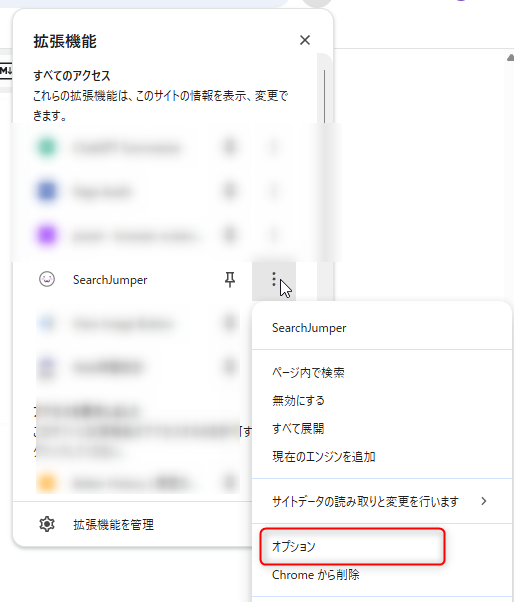
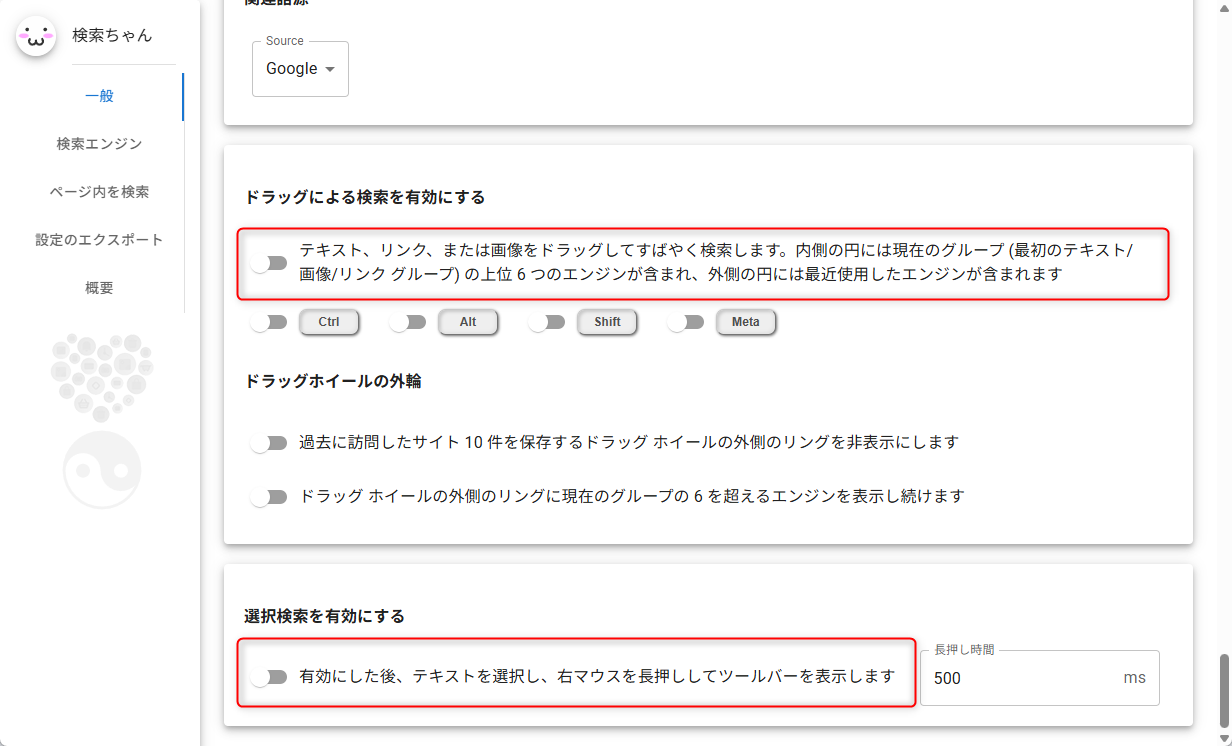
Main Usage
Clicking the extension opens a menu. Enter a search keyword -> select a search set and the search will run.
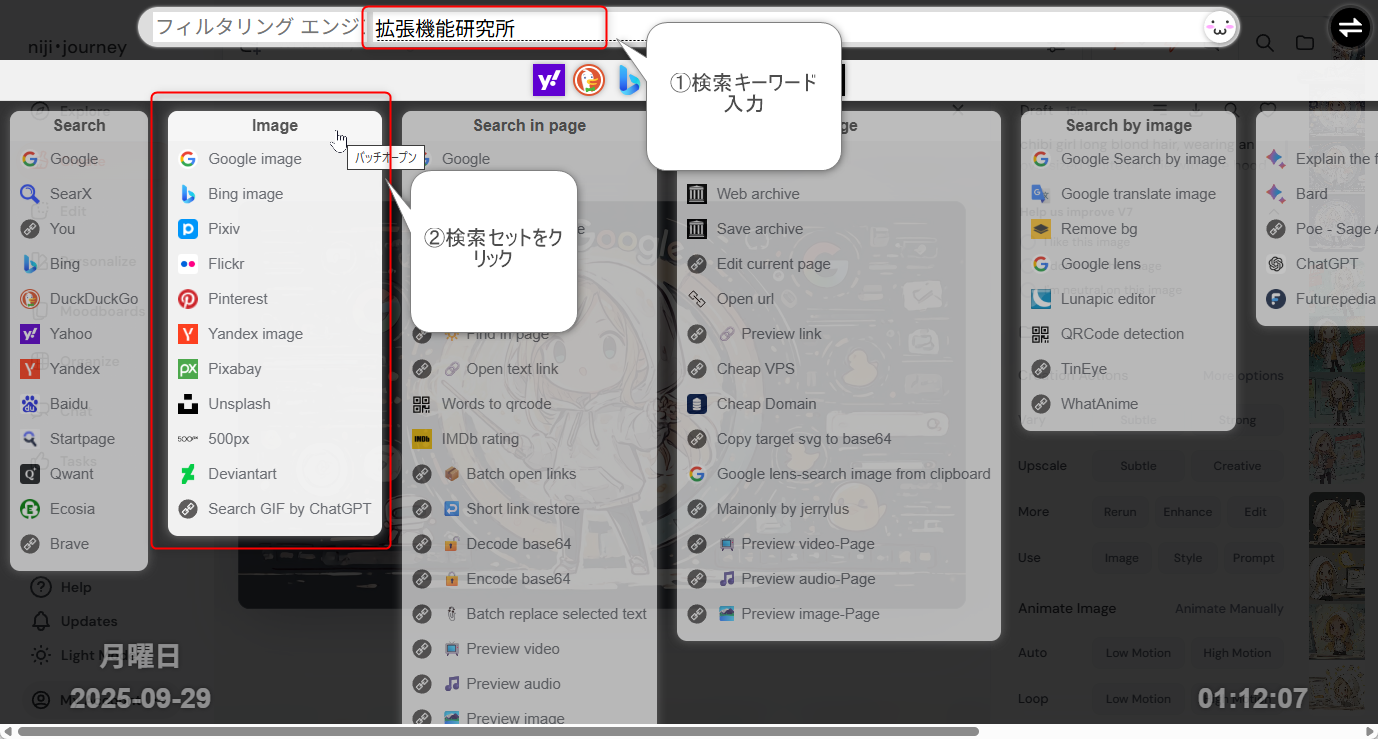
Alternatively, if you perform a simple Google search, a menu appears on the left. Switching the menu changes the search results.

There is also a set that collects AI-focused engines.
https://search.hoothin.com/set/ai_en.html
Security and Privacy Information
SearchJumper explicitly states in its privacy policy that it does not collect user data, display ads, or perform tracking. This is an important point for users who prioritize privacy. Because the project is open source and the code is published, there is transparency regarding security, making it safe to use. However, extensions are granted permissions in the browser, so as a basic security practice you should always verify the official page and distribution source before installation and avoid suspicious extensions.
Making Search Tasks More Comfortable
SearchJumper is a multifunctional tool that matches keywords such as multiple search engines, right-click search, custom search engines, regex search, open-source extension, privacy protection, AI search assistant, search efficiency, browser extension, multi-browser support. Its high degree of customization allows you to configure it freely to suit your needs, making it useful for routine research and improving work efficiency. Consider installing it from the official site or the Chrome Web Store.
Installing from the Chrome Web Store's SearchJumper page can help improve your browsing efficiency.




 Hatena