Many users sometimes want to add a small personal touch to the cursor in their web browser. Custom Cursor Effects Customizer is a Chrome extension that lets you apply a wide variety of custom cursors, animated trails, and click effects on any web page. This enables you to personalize an otherwise monotonous browsing experience. Settings are stored locally, so you can use the extension without concerns about privacy. Keywords such as custom cursors, cursor effects, animated trails, click effects, cursor replacement, web customization, local settings storage, cursor trails, particle effects, and privacy-conscious design capture the features that make web customization enjoyable.

Extensive features that expand customization
| Feature | Details |
|---|---|
| Multiple preset custom cursors | Choose from a large selection of preset styles. |
| Upload support for custom cursor files | Upload and use your own cursor images. |
| Apply animated trails | Configure various trail effects such as particles and light streaks. |
| Click effect display support | Visual effects like ripples and highlights appear on click, enhancing the interaction feel. |
| Local storage of settings | All user settings are stored locally in the browser; no data is transmitted externally. |
Notable aspects include the following:
-
Flexible cursor customization
You can use preset styles or upload your own files, offering a high degree of freedom. -
Multiple types of animated trails
Select from various trail types such as particles or light streaks to suit your needs. -
Visual click effects
Visual feedback on actions makes the experience feel natural. -
Fine-grained trail adjustments
You can adjust particle density and update intervals for precise tuning to your preferences. -
Privacy-conscious design
Data is stored locally and no personal information is collected, allowing you to use the extension with confidence.
Tips for how people commonly use it
| Who | Useful scenarios |
|---|---|
| Website visitors | When you want to change the look of a favorite site by setting a unique cursor |
| People working from home or during tasks | When you want visual feedback for clicks and movements to stay engaged while working |
| People who want to customize their web experience | When you want to freely configure trails and click effects to personalize browsing |
Quick overview of how to use it
- Search for "Custom Cursor Effects Customizer" in the Chrome Web Store or access it directly from here: https://chromewebstore.google.com/detail/Custom%20Cursor%20Effects%20Customizer/hlkcdccpefokpkdemiccigdoafkoljnp
- Click "Add to Chrome" to install.
- Open the extension menu from the browser's top-right extension icon
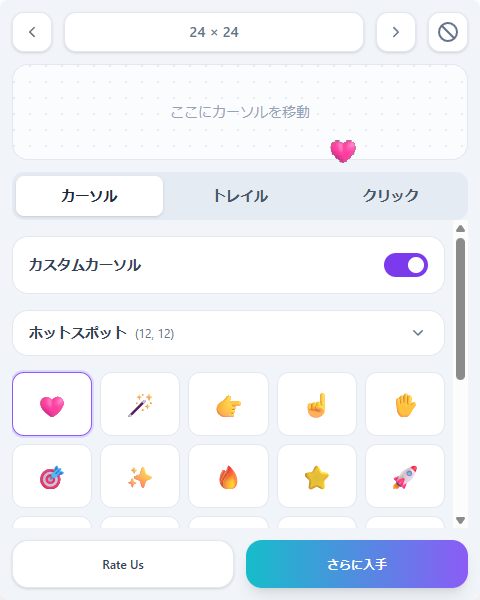
- Select a preset custom cursor or upload your own image.
- Configure trail animations and click effects to your preference.
- Changes are saved locally, so you can browse with confidence.
Administrator's impressions from trying it
There are many extensions that change the cursor, but this may be one of the few that allows changing both cursor trails and click effects. It could be useful for users who frequently lose track of the cursor in the browser.
It appears to be made by the same developer, and the following similar extension has more downloads:
Cursor Trails - Custom Cursor Trails
https://chromewebstore.google.com/detail/cursor-trails-custom-curs/ilngnjopnchkedjkdjlalnlbfpkhmbie
I could not tell the difference myself.
Privacy and security
Custom Cursor Trails publishes an official privacy policy: https://custom-cursor.com/privacy. The extension does not perform unnecessary data collection or secondary data use and is designed to be safe to use. Users who are concerned about browser extensions can use this one with reassurance.
Summary: Customize your cursor with ease
Custom Cursor Trails is an extension that can instantly transform your cursor into a favorite style with POP MART collaborations or SVG trails. It works on both Chrome and Edge, so it can be installed regardless of your environment. It is recommended for users who want to add a bit of color and playfulness to their daily browsing. Try it now from here: https://chromewebstore.google.com/detail/Custom%20Cursor%20Effects%20Customizer/hlkcdccpefokpkdemiccigdoafkoljnp



 Hatena